Review the studio dashboard
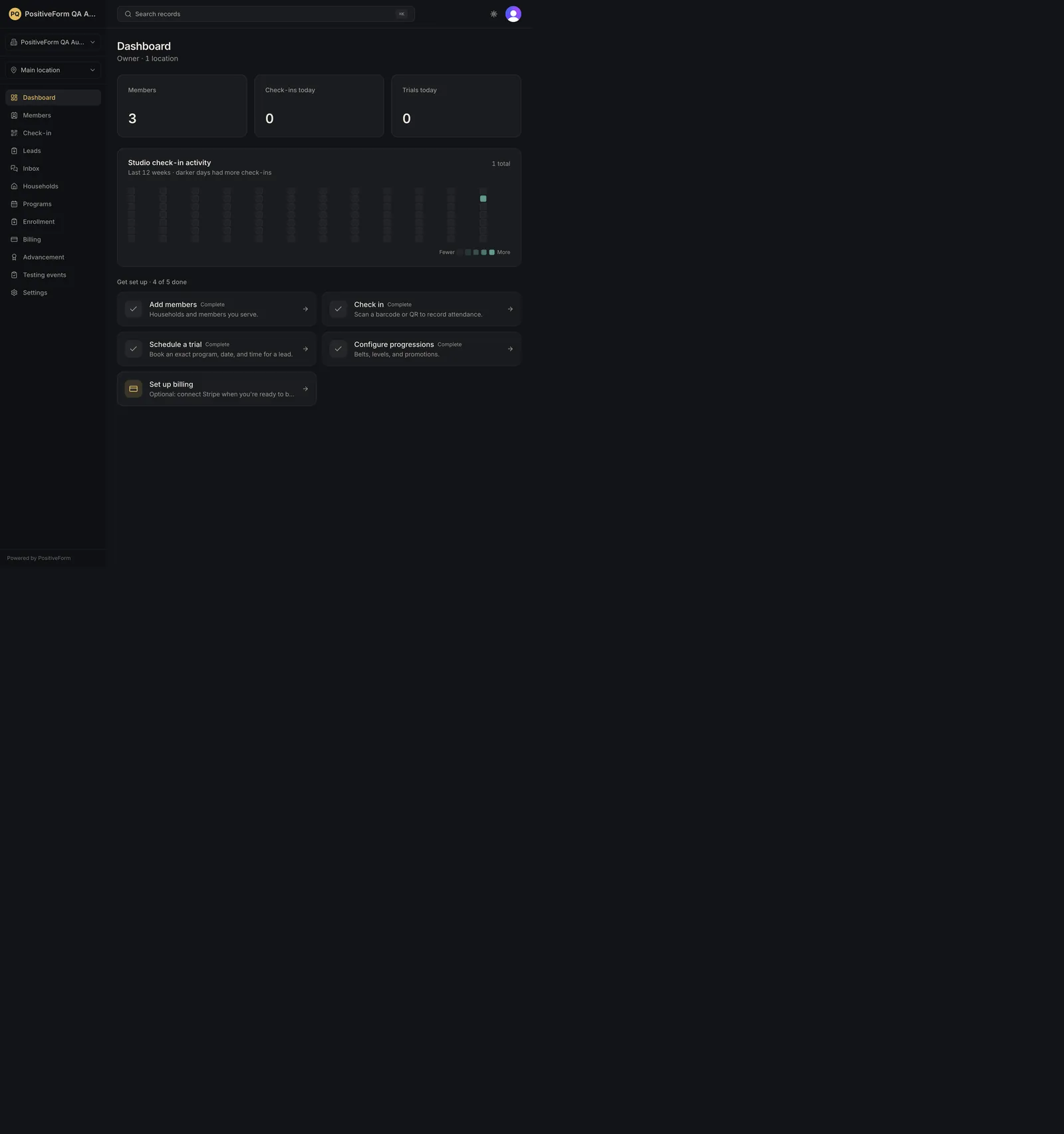
See current setup and check-in activity from the dashboard. The dashboard shows current organization-scoped setup status and recent check-in activity.
- Status
- Draft, not yet re-verified
- Who can do this
- Organization owners, Managers, Staff
- Required access
organization.membership- Where in PositiveForm
/
"Copy for AI" puts the full Markdown of this page on your clipboard. Paste it into ChatGPT, Claude, or any assistant and ask it to walk you through the steps.
Who this is for
Owners, managers, and staff who need a quick view of studio activity and setup status for the current workspace.
Required access: membership in the selected organization.
Before you begin
- Select the organization you intend to review. Its name is the branding at the top of the sidebar, with the organization selector directly under it.
- Select the operating location from the Location control in the sidebar if the organization has more than one. With a single location the control is not shown.
Steps
- Select Dashboard in the main navigation, or open
/. - Confirm the line under Dashboard, which names your role and how many locations you can work in.
- Read the attention banners when they appear: N active members still need a waiver on file opens the members list filtered to that gap, and N walk-in waivers need linking to a member opens the agreement templates page where the walk-in queue lives. Neither is a block on anything; both are work waiting.
- Review the Active members, Check-ins today, and Trials today summary cards. Each card is a link: to the members list, to check-in, and to the trial board on the Leads page.
- If Get set up · N of M done appears, open the next incomplete task. The tasks are Add members, Check in, Schedule a trial (which opens the pick-or-create trial dialog rather than a page), Configure progressions, and Set up billing. Dismiss hides the checklist for good for you in this organization.
- Review Studio check-in activity, which reports its date window, the total in that window, and a day grid of check-in history through yesterday.
- Review Birthdays for the next 7 days. Load more birthdays pages through them and then widens the window up to 30 days.
- Review Upcoming events for the next 7 days: classes, trial arrivals, and studio events in time order. A class or trial row opens a dialog for checking in, booking a trial into that class, or opening the program; a studio event row opens the event.
Expected outcome
The dashboard shows organization- and location-scoped counts, any waiver work waiting, remaining setup, check-in history, upcoming birthdays, and the next week of classes, trials, and events.
Screenshots
Recovery
- If the counts belong to another workspace, stop and correct the organization or Location selector before opening a record.
- If a card cannot load, use its retry control when one is offered. Report a finding if the same card still fails after one retry.
- A missing Get set up section means every setup task is complete, or that you dismissed it. Neither is an error, and dismissing it is permanent for you in this organization.
Related guides
- ATT-002 — Record a member check-in from the attendance workspace.
- SET-001 — Open the full settings index for studio configuration.