Check in from a member workspace
Check in a member and undo the check-in when needed. The check-in appears immediately and undo restores the prior state.
- Status
- Draft, not yet re-verified
- Who can do this
- Organization owners, Managers, Staff
- Required access
members.change- Where in PositiveForm
/members/:memberId/overview
"Copy for AI" puts the full Markdown of this page on your clipboard. Paste it into ChatGPT, Claude, or any assistant and ask it to walk you through the steps.
Who this is for
This guide is for desk staff, managers, and owners who already have a member open and want to record that they trained without going to the Check-in desk.
You need the members.change permission.
Before you begin
- Open the member at the location where they train.
- Prefer Run front-desk check-in when several people are arriving at once; this path is best for one person already on screen.
Steps
- Open the member from Members, search, or a related link. You land on their Overview tab.
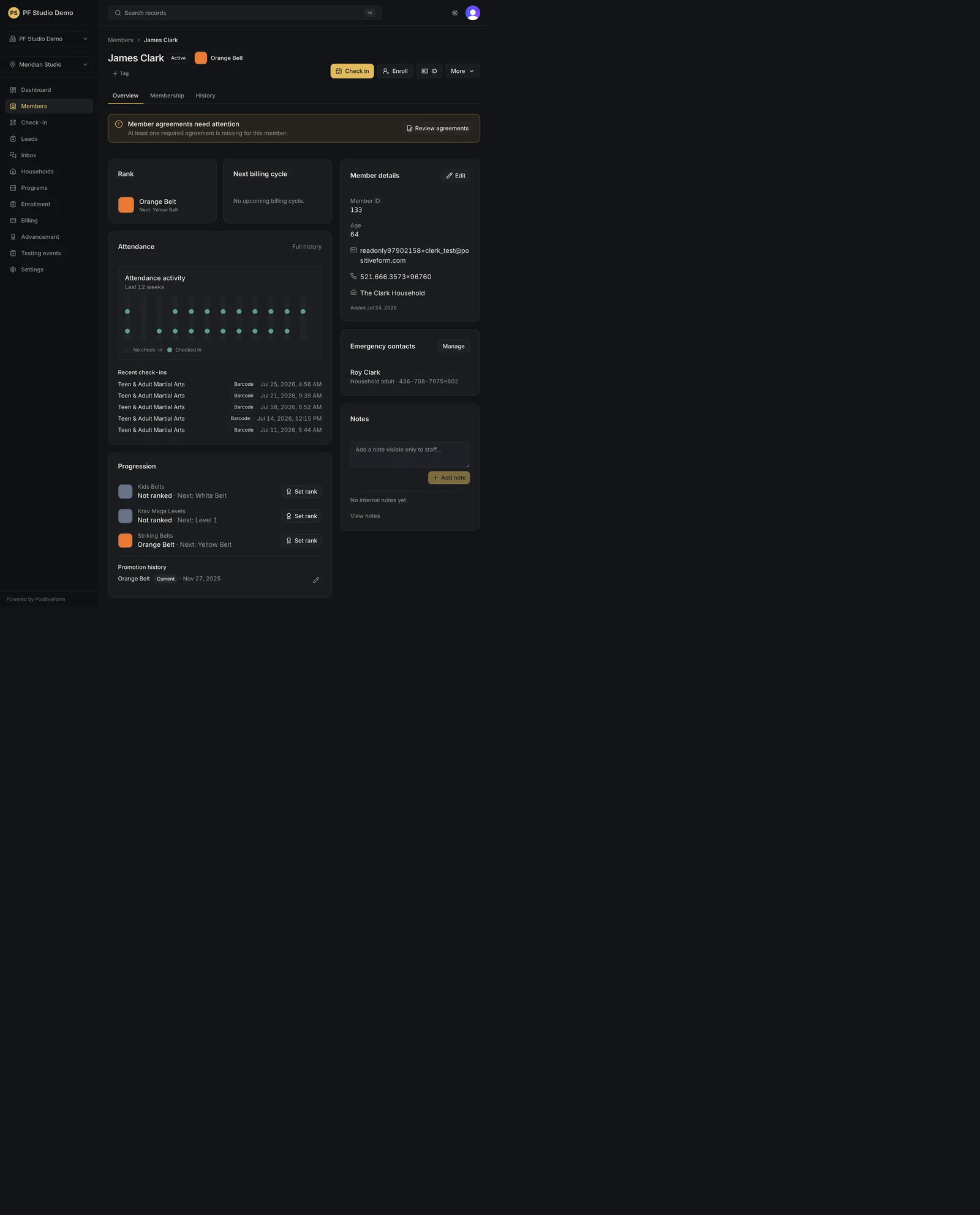
- Find Check in in the row of actions beside the member's name on Overview.
- Click Check in. While it saves, the button reads Checking in….
- Confirm the success state. PositiveForm toasts {name} checked in, or This member was just checked in when a recent visit already exists. A banner appears above the tabs reading Checked in or Already checked in today, with the class (or General check-in) and the time.
- When this click created the visit, an Undo check-in control appears in that banner so you can reverse a mistaken click. It reports Check-in undone. Do not undo a visit you did not create.
- Review the Attendance panel on the same overview. It shows a week-by-week grid of the days they checked in, with a summary such as 12 visits · last Aug 24. Open Full history → for the full list, including class and method.
Expected outcome
A staff-method attendance record is stored for the member. It appears in their Attendance panel and history, and in the location’s Check-in history (Review attendance history).
Screenshots
Recovery
If Check in is not on the record at all, you are looking at a household adult who is not a member themselves. Those records carry household, role, and billing context but no attendance, so open the member who trains instead.
An outstanding required item never blocks Check in; the action stays enabled while those are open.
If check-in fails, PositiveForm shows Check-in failed. Please try again. and does not invent a visit.
If you click Check in twice in quick succession, the second result is the neutral This member was just checked in notice, and no Undo check-in control appears, because this click did not create that visit.
Related guides
- Run front-desk check-in — front-desk search and check-in.
- Review attendance history — location-wide history.