Create a program
Create a reusable program and open its operational workspace. The inactive program is created at a stable program route with clear setup actions.
- Status
- Draft, not yet re-verified
- Who can do this
- Organization owners, Managers, Staff
- Required access
members.change- Where in PositiveForm
/programs
"Copy for AI" puts the full Markdown of this page on your clipboard. Paste it into ChatGPT, Claude, or any assistant and ask it to walk you through the steps.
Who this is for
This guide is for desk staff, managers, and owners setting up a class, course, or camp.
The page states the order it expects: create the offering first, then configure its people and schedule when ready. Creating one is a six-step wizard on its own page, and every step after the name is optional, so a program with no schedule and no roster is a normal state to leave it in.
You need the members.change permission.
Before you begin
- Select the location the program runs at, using the location picker in the sidebar. A program belongs to the location you are working in, and Create program stays greyed out until one is selected.
- Have a name families will recognise. Everything else can wait.
Steps
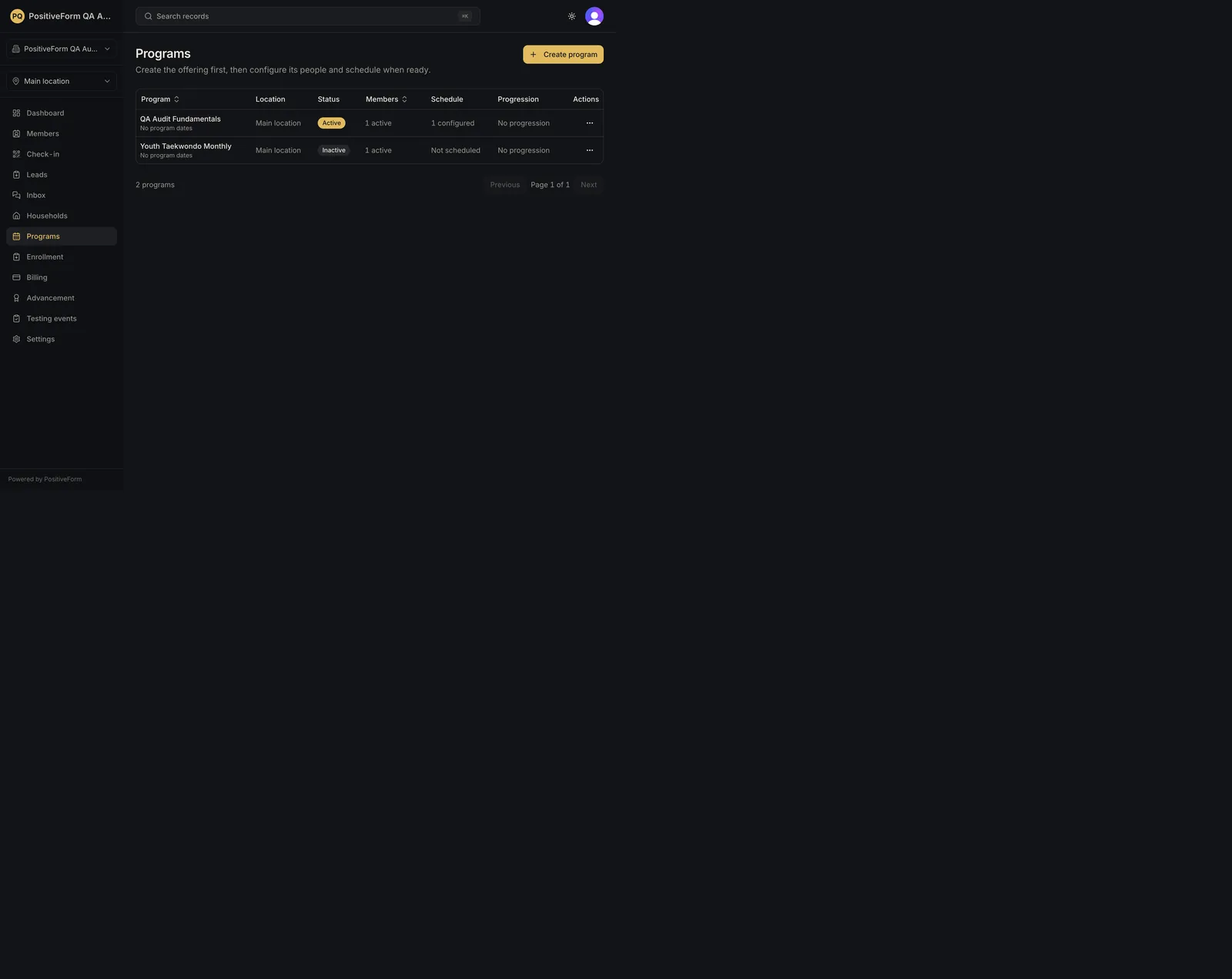
- Click Programs in the left navigation. The list shows each program under Program, Location, Status, Enrolled, Schedule, Progression, and an Actions menu.
- Click Create program. Create a program opens as its own page, with a step strip reading Name, When, Progression, Groups, Staff, Finalize, and an Offering draft panel beside it that fills in as you answer.
- On Name this program, fill in Program name. The page names the location it will be created at. Use Description (optional) if it helps staff tell similar programs apart. Continue stays disabled until the name has something in it.
- On When it runs, set Status. It starts at Inactive, which is usually what you want until the schedule is ready. Set Starts on (optional) and Ends on (optional) for a program that runs for a defined period, and Youngest age (optional) and Oldest age (optional) for who it is aimed at. Ages are guidance the desk sees when booking a trial, not a lock; leave both blank for all ages.
- On Progression and labels, choose an Advancement progression (optional) and any Program tags (optional). Tags are reusable staff labels and do not limit who can join.
- On Available training groups, tick the reusable groups staff may later assign to this program's class times. Ticking a group is not enrolling anybody. Skip the step if you are not ready; groups can be enabled on the program afterwards.
- On Usual staff, add the people who normally run it. This is optional, and individual class times can assign their own staff later.
- On Finalize and save, check the summary line, optionally set a URL slug (optional) (blank generates one from the name), and click Finalize and save.
Back returns to the previous step, the step strip jumps back to any step you have already passed, and Cancel at the top leaves without creating anything.
Expected outcome
PositiveForm confirms with Program created as inactive, or Program created if you set the status to active, and opens the program's Overview at its own stable route, which is what you can bookmark or send to a colleague.
Whatever you left out, the workspace says so rather than hiding it: Next meetings reads No upcoming meetings. Add a weekly or one-off schedule in Schedule. until a schedule exists, Action items lists the setup still outstanding (Review program status, Set a schedule, Assign staff, Enroll a member), each linking to the tab that fixes it, and Pricing reads No plans yet.
In the programs list it shows Not scheduled with No program dates until you add class times and dates. That is accurate rather than a warning. A program left inactive is hidden by the list's default status filter, so switch that filter to find it again.
Continue in Manage program schedules to give it class times, or Manage program lifecycle to set its status, dates, and progression.
Screenshots
Recovery
If Create program is greyed out, or the wizard opens on Choose a location first, no location is selected. The location comes from the picker in the sidebar rather than from the wizard, which is the part people miss.
If saving is refused with A program name is required., the name is blank. The wizard returns you to the step carrying the problem for a backwards date range (Ends on before Starts on) or an age range where the oldest is below the youngest.
If the slug you typed is already taken, PositiveForm says so and nothing is created. Slugs are unique per organization; leave the field blank to have one generated from the name.
If the program was created with the wrong name, rename it on its Settings tab; see Manage program lifecycle. Do not create a second one.
Related guides
- Manage program schedules — give the program its class times.
- Manage program lifecycle — set its status, start and end dates, and advancement progression.