Manage program pricing plans
Attach or create program plans, choose a default, and archive obsolete plans. The plan catalog changes without enrolling or charging anyone.
- Status
- Draft, not yet re-verified
- Who can do this
- Organization owners, Managers
- Required access
billing.manage- Where in PositiveForm
/programs/:slug/overview
"Copy for AI" puts the full Markdown of this page on your clipboard. Paste it into ChatGPT, Claude, or any assistant and ask it to walk you through the steps.
Who this is for
This guide is for an owner or manager with the billing.manage permission,
setting what this program costs.
The critical property: building the plan catalog charges nobody. Adding a plan here makes it available to choose. Money only moves when a household subscription is created against it; see Create a household subscription.
If Add plan is not on the page, your role does not carry billing.manage.
Before you begin
- Connect billing first. Plans reference real prices, so the Stripe connection needs to be in place; see Configure billing policies and catalog.
- Decide whether you are reusing a price you already have or creating a new one. Reusing keeps your catalog tidy and your reporting consistent.
- Decide whether the plan carries a joining fee. A plan can hold a default activation fee, a one-time charge staff can apply when they start a paid membership on it.
Steps
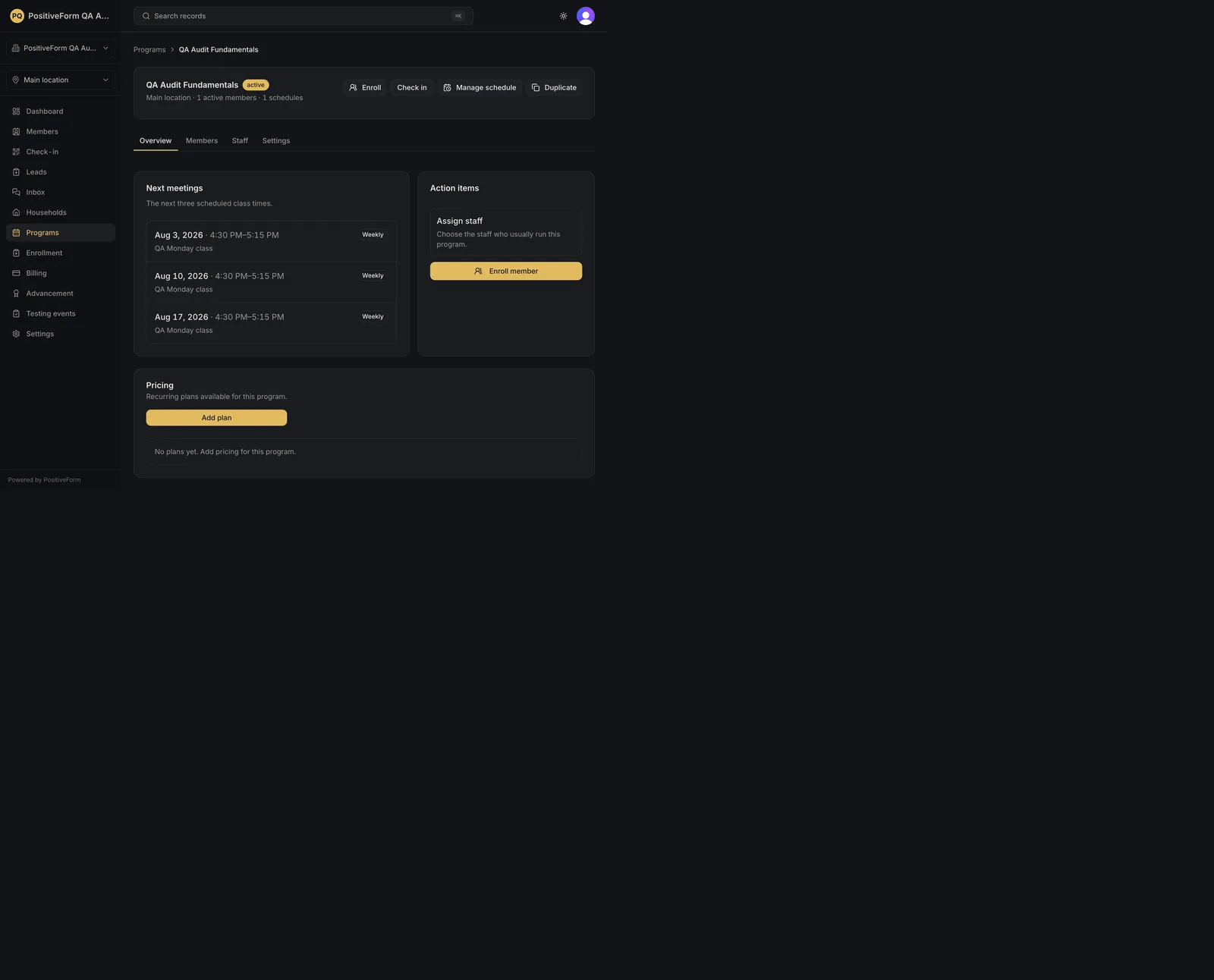
- Open the program. On Overview, find Pricing, which lists the recurring plans available for this program with their optional activation fee defaults. With none set up it reads No plans yet. Add pricing for this program.
- Click Add plan.
- Choose Attach existing to reuse a price you already have, then pick it under Existing price. The picker offers recurring Stripe prices already synced to your catalog and not yet attached to this program.
- Or choose Create new, then fill in:
- Name, for example
Kids Taekwondo Membership. This is what staff see when choosing a plan. - Amount, for example150.00. - Billed: Monthly or Yearly. - Either way, use Activation fee (optional) if this plan carries a one-time joining fee. It becomes the plan's default, charged when staff start a paid membership with the fee enabled. Leave it blank for no fee.
- Click Add plan.
- Each plan on the list carries Make default, Activation fee, and Archive. Use Make default if this program has an obvious usual choice; the default is badged on the list.
- Use Activation fee on an existing plan to set or change its joining fee. Enter an amount and click Save activation fee, or clear the field and save to remove the fee.
- Use Archive on a plan you no longer sell. PositiveForm asks to confirm, explaining that existing members keep their current price and the plan will no longer be available for new subscriptions; Archive plan confirms.
Expected outcome
PositiveForm confirms with Plan added, and the plan appears under Pricing as available for this program.
Nobody is enrolled and nobody is charged. The catalog is a list of what a family could be signed up to; the charge happens when a household subscription is created against a plan.
Setting a default confirms with Default plan updated and only changes which plan is preselected. Setting a joining fee confirms with Activation fee updated, or Activation fee cleared when you empty the field; it changes what staff are offered on the next paid membership and charges nobody now. Archiving confirms with Plan archived and stops the plan being offered for new subscriptions; it does not cancel subscriptions already using it, and it does not stop those families being billed. An archived plan drops off this list.
Screenshots
Recovery
If adding fails, PositiveForm shows the reason and no plan is created. An amount it will not take is refused before anything is sent, with Enter an amount greater than zero, with no more than two decimal places., or the equivalent message for an activation fee. Enter a plan name. and Choose an existing price. name the other two missing answers.
If the default will not change, you get Could not update the default plan. and the previous default stands.
If archiving fails, you get Could not archive this plan. and it stays available.
If you archived a plan families are still paying on, they keep being billed. Archiving controls what can be sold next, not what is already sold; change those subscriptions at the household.
If Existing price offers nothing, the dialog says which of the two reasons it is. Connect Stripe before attaching a price means billing is not connected yet; see Configure billing policies and catalog. Otherwise it tells you to categorize a product as a subscription under Settings › Billing setup. In either case Create new is the way through.
If the dialog says Could not check attachable prices., the list failed to load rather than being empty. Use Try again.
If you added a plan at the wrong amount, archive it and add the correct one rather than editing a price families may already be on.
Related guides
- Create a household subscription — the step that actually charges a family, using a plan from this catalog.
- Configure billing policies and catalog — connect billing before any of this works.