Configure billing policies and catalog
Configure schedules, approval policy, discounts, and one-off items. Customer-facing billing configuration saves without exposing or changing platform…
- Status
- Draft, not yet re-verified
- Who can do this
- Organization owners, Managers
- Required access
billing.manage- Where in PositiveForm
/settings/billing
"Copy for AI" puts the full Markdown of this page on your clipboard. Paste it into ChatGPT, Claude, or any assistant and ask it to walk you through the steps.
Who this is for
This guide is for owners and managers configuring studio billing settings: when subscriptions bill, which changes need approval, and the discounts and one-off items staff can charge.
Before you begin
- You need billing management access. Only an organization owner can set the approval policy and categorize Stripe products.
- Discounts, one-off items, and the product list appear only once payments are connected (Connect and operate Stripe).
Steps
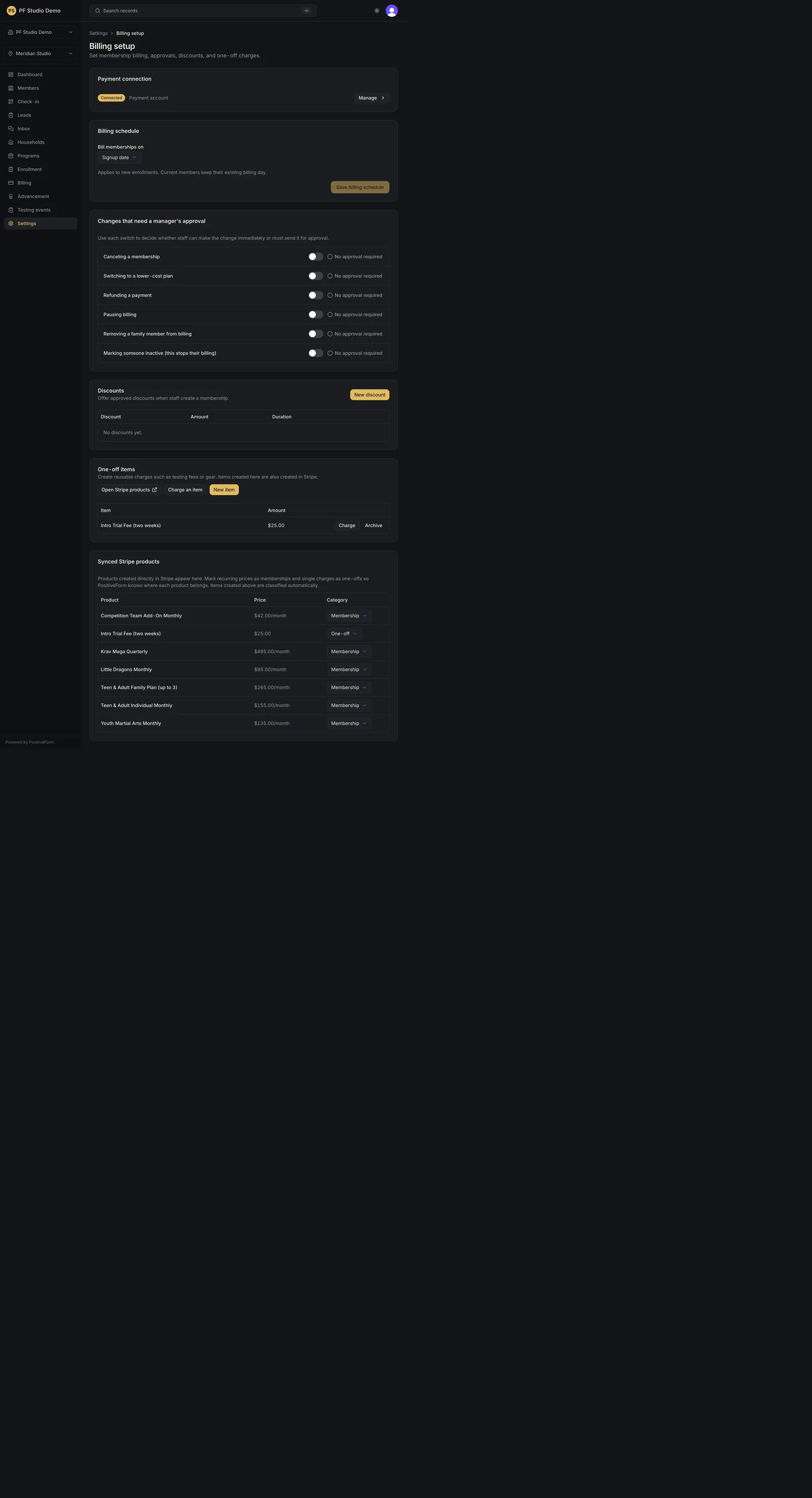
- Open Settings, then Billing setup under the Billing group
(
/settings/billing). - Check Payment connection. It shows the connected account and a Manage link to the Stripe integration, or Connect payments when nothing is connected.
- Under Billing schedule, set Bill subscriptions on to Signup date, 1st of the month, or 15th of the month. When you pick a day of the month, Partial first month appears: choose Prorated or Free. These apply to new enrollments only; current members keep their existing billing day. Click Save billing schedule. Leaving the page with unsaved changes warns you first.
- Under Changes that need a manager's approval, turn on each change that should be held for an approver: canceling a subscription, switching to a lower-cost plan, refunding a payment, pausing billing, removing a family member from billing, and marking someone inactive. Each toggle saves immediately. Staff are never blocked outright; their request is held for a decision (Approve billing changes).
- Under Discounts, use New discount to add one: Name, the Discount kind (Percent or Amount), its value, and a Duration of Every charge, First charge only, or First N months (which asks for Months). Archive retires a discount.
- Under One-off items, use New item to add a name and amount. Charge on a row opens the charge dialog with that item selected (Create and refund one-off charges); Archive retires it.
- Under Synced Stripe products, set each product's Category to Subscription, One-off, or leave it Uncategorized. Items you created above are categorized automatically.
Expected outcome
Studio billing configuration matches the policies you set. The billing schedule and approval policy govern what staff can do without a second decision, and the catalog controls what they can charge.
Screenshots
Recovery
If a save fails, keep the form open and correct the fields named in the error. A failed approval toggle reverts on screen and reports the reason. If the discounts, one-off items, or products cards are missing entirely, payments are not connected yet.
Related guides
- BILL-004
- BILL-005
- INT-001